My photography website is work in progress and needs further content and some minor changes to design. There will probably be fewer images in the future when I get around to the editing. For now however I am uploading regularly as I find hidden images, due largely to a folder system that needs an overhaul.
www.nigelroberson.co.uk
Showing posts with label IT. Show all posts
Showing posts with label IT. Show all posts
Wednesday, 10 August 2011

Friday, 29 July 2011
The Photographer's Ephemeris
This evening I set about the task of researching a "Photography Website" so that I can make use of a domain that I own, http://www.nigelroberson.co.uk/ . my other .com website is used for my engineering work and the .co.uk directs visitors there at the moment. I do have a copy of Dreamweaver CS5 so should build my own, but right now I need something quick to get a few photographs into the public gaze without reinventing the wheel. So, looking at Clikpic. Layerspace etc I came across a website where the photographer was using "The Photographers Ephemeris". Now I know the world is big and the www even bigger but I had never heard of this phrase, nor did I realise it was software. In a nutshell it is free software that shows you on a map where the sun/moon will rise and set at any location. For landscape and architectural work this device is another tool in the box that will take some of the hard work out of planning a shoot.
For instance:
Location : A149 Knights Hill, Kings Lynn
When will the sun set exacting along the center of the road looking towards the town ?
Answer: 15th October, 18:03
The alignment of the setting/rising sun and moon along strong topographical features will only happen twice every year and is a constant source of disappointment when the opportunity is missed.
Needles to say I haven't got much further with the website as I am now mousing a little icon all over Norfolk and The Fens looking for upcoming alignment of the sun and moon with rivers, churches etc.
The Photographers Ephemeris
For instance:
Location : A149 Knights Hill, Kings Lynn
When will the sun set exacting along the center of the road looking towards the town ?
Answer: 15th October, 18:03
The alignment of the setting/rising sun and moon along strong topographical features will only happen twice every year and is a constant source of disappointment when the opportunity is missed.
Needles to say I haven't got much further with the website as I am now mousing a little icon all over Norfolk and The Fens looking for upcoming alignment of the sun and moon with rivers, churches etc.
The Photographers Ephemeris
Friday, 28 January 2011
Data storage - update
Finally my 440GB of images on the Tank drive has a backup. The prospect of losing them had haunted me after the PC crash. They are stored at a second location on a 1TB drive inside the new PC. I am amazed at the speed of a full spec (i7 and 8GB Ram) 64 bit machine. It opens CS5 in 2 secs and a 250MB image in less than 1 sec. I know all this seems superficial, especially in the context of what I was doing in a wet darkroom but the power and speed of the PC will enhance my work. In the past I had not used Layers to their full extent, mainly due to the time it would take processing a 4 layer 1GB file. Consequently I worked live on the image and regretted it due to the lack of correction available during the final stages of PP.
The only drawback I can see at the moment is CS5. Yet more learning and hunting for familiar controls, perhaps I should buy a book.
The only drawback I can see at the moment is CS5. Yet more learning and hunting for familiar controls, perhaps I should buy a book.
Friday, 14 January 2011
Data Storage
Further to the last I need to mention the problems with online storage. Unless you have an amazing upload speed this will not work. I have just over 440GB of image data and uploading it will take 55 days. I have an unlimited use broadband and a business account that is as about as quick as I can buy and it simple is too slow. With the data still in one place I am at risk and need to be careful. A new PC is being constructed with 4 x 1TB drives and that will be used as a store backup while NAS storage is arranged.
Monday, 10 January 2011
PC Crash - Backups - Angst
I am convinced that there is a purpose to a PC crash, other than making you feel physically sick. Firstly it reminds you why all the image files are not stored on the PC (lessons learnt in the past prevented that) and secondly it allows you to find all the application software discs and licence numbers that were stored safe somewhere about 4 years ago and cant now be found for love nor money. In addition you learn so much all over again. How to reload plugins into PS. How to download and store the icc profiles for the various papers and how to recalibrate the monitor. All this in addition to the fact that you can rewire all the peripherals (card reader, tablet etc), remembering why some work better than others in certain USB ports and why the 2TB drive has to use Firewire or it behaves badly.
So, after a reinstall of Windows XP Pro and 3 days of getting back to square one there is still a nagging feeling that the external HD (Image Central) needs backing up too. I had considered another similar device, perhaps with an IP address so it could be accessed from anywhere, but there is an alternative, and its online. I am still researching who I will use, but these guys are offering a web based storage system that in itself is backed up to a second physical location. In theory my images will never be lost or feel threatened ever again.
So, after a reinstall of Windows XP Pro and 3 days of getting back to square one there is still a nagging feeling that the external HD (Image Central) needs backing up too. I had considered another similar device, perhaps with an IP address so it could be accessed from anywhere, but there is an alternative, and its online. I am still researching who I will use, but these guys are offering a web based storage system that in itself is backed up to a second physical location. In theory my images will never be lost or feel threatened ever again.
Sunday, 5 September 2010
Large Format
Its not that long ago that I said " Perhaps if I buy a black cloth I will buy a 5x4 camera" . I didn't buy a black cloth but I do now have a 5x4 camera. A Wista 45DX flatbed field in cherry wood. The only lens I have at the moment is a Rodenstock 150mm (standard lens for 5x4) some Provia 100f and a quickload back. I am not sure I will take any photographs for some time because I am still fascinated by the options that it will give me in the field. It is therapeutic to sit behind it and conjure up the various scenarios where it will be used. I already know some locations at the southern end of Derwentwater (Manesty) where I can spend hours with my new baby. Some of the lens movements I am used to. I have a 24mm tilt/shift for the Nikon and love the tilt for landscape and the rise for buildings. The Wista has these of course, in amazing amounts, but coupled with front and rear swing the options are endless. The second reason for trying some LF is to produce bigger high resolution prints. I am lucky to have a 24" roll fed printer and I can maximise the quality of that with enormous file sizes from scanned 5x4. There is much to be learned about using LF. Some relearning about film, such as reciprocity factor and exposure compensation with bellows. Scanning will be done at first with a 2450 Epson, but that will go soon and a V750 acquired. There seems to be the need to use adjustable film holders, ensuring that the film is correctly in focus. Scanning software in my experience ranges from chalk to cheese in its ability. The bundled Epson works, but specialist software is better and needs time to set up.
How does this effect my OCA work ?. Initially I thought, not much, but if I do Edward Weston as my essay and my later assignment, it would be nice to shoot it all on LF. It may help to get into the role and think more "Weston" rather than switching on a D3.
I will come back to this again.
How does this effect my OCA work ?. Initially I thought, not much, but if I do Edward Weston as my essay and my later assignment, it would be nice to shoot it all on LF. It may help to get into the role and think more "Weston" rather than switching on a D3.
I will come back to this again.
Monday, 5 April 2010
HDR - Software Testing
I took some time today to look at HDR and Tone Mapping. Michael Freeman has an interesting section on his website and it seemed the time to have a look at a technique that has become fashionable in recent months. I had looked at HDR a while ago, and used CS3 with absolutely no success. The results were horrible, and as I had no immediate need for the technique I had left it alone. A while ago I had to shoot some hotel room interiors with a massive DR. In that instance I had made 2 exposures, laid one over the other and with a mask and soft brush blended the two as one. The result again was not that good. So, with Landscapes on the agenda, and the possibility of future difficult interiors I returned to the subject.
Photomatix is specialist software for this purpose and seems to offer plenty of control, for "normal" HDR output. I say normal because much of what I have seen in the past has a "painterly" look that cinematographers are using in film making where CGI is involved. All I want is the ability to overcome the constraints of the CCD in my camera. Most CCDs can only see about 4.5 stops of DR. The human eye can adjust itself to see a range of 24 stops.
HDR software uses a number ( say 5 for most situations) of frames of the same image, all with a different exsposure and combines them as one. Typically the bracketed frames will be at -2, -1, 0, +1, +2 stops.
I had taken a few bracketed sequences of Castlerigg Stone Circle, but only 3, -1, 0, +1
This image is my first attempt and in monochrome.
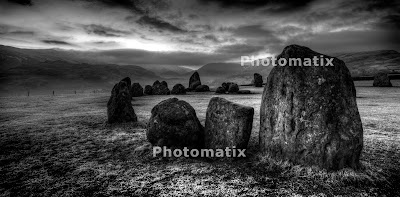
Photomatix is specialist software for this purpose and seems to offer plenty of control, for "normal" HDR output. I say normal because much of what I have seen in the past has a "painterly" look that cinematographers are using in film making where CGI is involved. All I want is the ability to overcome the constraints of the CCD in my camera. Most CCDs can only see about 4.5 stops of DR. The human eye can adjust itself to see a range of 24 stops.
HDR software uses a number ( say 5 for most situations) of frames of the same image, all with a different exsposure and combines them as one. Typically the bracketed frames will be at -2, -1, 0, +1, +2 stops.
I had taken a few bracketed sequences of Castlerigg Stone Circle, but only 3, -1, 0, +1
This image is my first attempt and in monochrome.

Notes for future work:-
- Use the 5 shot auto bracket set up from -2 to +2 and shoot on high speed multi frame setting. If not, as the clouds move there are issues with registering the images.
- Always use A priority so that shutter speed is varied and not f stop. This ensures constant depth of field and in focus elements are easier to register.
- Always use the tripod.
- Continue to use the ND graduated filters as these will help the highlights.
The watermarks are due to it being a trial version
Subscribe to:
Posts (Atom)